Yesterday, my production API (prod.cliqapp.co) went dark.
Visitors were greeted by the dreaded Cloudflare Error 521: Web Server Is Down. If you’ve ever managed a production environment, you know the cold sweat that follows that message. You check the server—it’s up. You check the systemd service—it’s active. You check the RAM—plenty left.
Yet, the internet kept telling me I was offline. Here is how I debugged, isolated, and eventually crushed a bot attack that was suffocating my Django backend.
The Mystery: A Tale of Two Subdomains
My setup for CLiQ seemed solid:
- Backend: Django & DRF running via Systemd.
- Server: A Hetzner VPS.
- Proxy: Nginx.
- DNS/Shield: Cloudflare (Proxied).
The strangest part? My PWA frontend (app.cliqapp.co) was working perfectly on the exact same IP address. Only the API was failing. It was intermittent; it would work for ten minutes, then vanish for an hour.
The Investigation: Entering the Matrix
I started by bypassing Cloudflare and hitting the origin IP directly:
curl -v -H "Host: prod.cliqapp.co" https://37.27.21.41
Result: Connection timed out.
This confirmed the issue wasn’t a Cloudflare glitch. My server was actively dropping packets or was so overwhelmed it couldn’t complete a TCP handshake. I dove into the Nginx access logs and found a digital war zone.
The Bot Storm
The logs were moving faster than I could read. Thousands of requests per minute were hitting the server from rotating IPs, looking for vulnerabilities that didn’t exist:
"GET /ups.php HTTP/1.1" 401
"GET /wp-content/plugins/hellopress/wp_filemanager.php HTTP/1.1" 401
"POST //vendor/phpunit/phpunit/src/Util/PHP/eval-stdin.php HTTP/1.1" 401
"GET /.env HTTP/1.1" 401
The catch? CLiQ is built on DRF. We don’t use PHP. We don’t use WordPress. But even though Nginx was correctly returning a 401 Unauthorized, the sheer volume of requests was exhausting the Nginx worker connections. My server wasn’t “down”—it was just so busy rejecting robots that it didn’t have any breath left to talk to my actual users.
The Multi-Layered Fix
1. Moving the Battlefield to the Edge (Cloudflare WAF)
The most efficient way to stop an attack is to make sure it never touches your server. I moved the “rejection” logic to Cloudflare’s global edge network. I built a custom WAF rule to block any request that even smelled like a PHP or WordPress scan. The Expression:
(lower(http.request.uri.path) contains ".php") or
(http.request.uri.path contains ".git") or
(http.request.uri.path contains ".env") or
(http.request.uri.path contains "/wp-")
Action: Block.
Result: Instant relief. My server load dropped by 80% within seconds as Cloudflare began dropping these requests before they reached Hetzner.
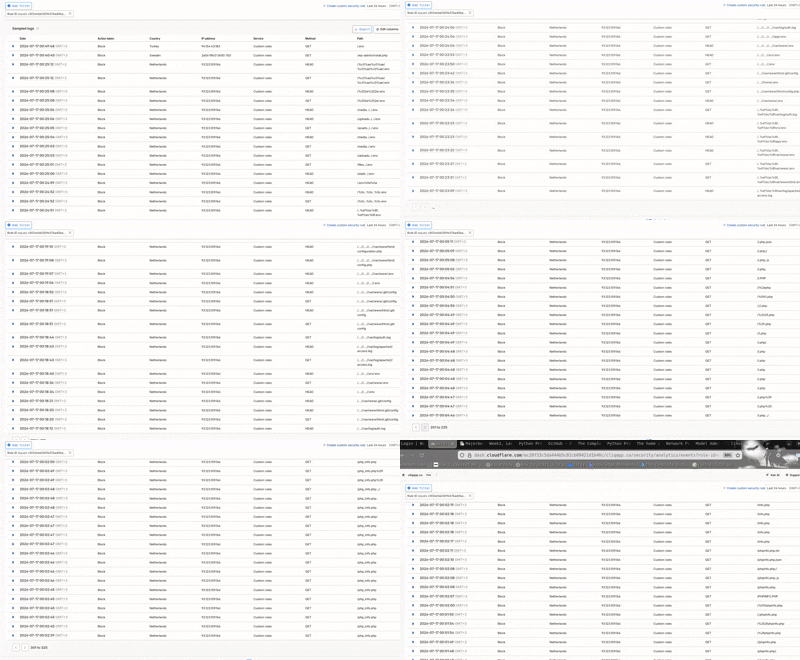
Real-time Cloudflare Security Events showing incoming bot traffic being dropped at the edge.
2. Fixing the “Real IP” Blind Spot
I realized why my Fail2Ban wasn’t stopping them: It was blind. By default, Nginx sees all Cloudflare traffic as coming from Cloudflare’s proxy IPs. When Fail2Ban saw an attack, it thought Cloudflare was the attacker. I had to tell Nginx to look inside the headers to see the real visitor – even though my drf logger was seeing the source IP. I created /etc/nginx/conf.d/cloudflare.conf:
# Trusting Cloudflare IPs
set_real_ip_from 103.21.244.0/22;
set_real_ip_from 104.16.0.0/13;
# ... (all other CF ranges)
real_ip_header CF-Connecting-IP;
real_ip_recursive on;
With this, my logs finally showed the actual IPs of the attackers, allowing my internal firewall to start banning individual bad actors automatically.
3. Lessons Learned
- Block early, block often: If you don’t use PHP, block .php at the DNS level. Don’t let your server waste a single CPU cycle on a request you know is fake.
- Logs can lie: If you use a proxy like Cloudflare, your logs are lying to you until you configure the realip module.
- Monitor the “Noise”: A 521 error isn’t always a crash. Sometimes, it’s just a server that’s too busy being bullied by bots to respond to legitimate traffic.
- CLiQ is now back up and faster than ever. My Cloudflare “Security Events” tab is now a satisfying wall of “Blocked” requests from across the globe.
Follow my journey building CLiQ or check out my other projects on github